
Download ImageCompression.SB – Image Compression Tool, Batch Processing, File Size Reduction
Overview
ImageCompression.SB is a practical mobile application designed to streamline the process of reducing image file sizes without compromising visual quality. It addresses the growing need for efficient storage management, particularly among users handling large volumes of digital photographs and media. The app enables users to compress multiple images in bulk, making it ideal for photographers, content creators, and anyone managing extensive image libraries.
By preserving the original files while generating optimized versions, ImageCompression.SB ensures data safety during processing. The target audience includes both casual users seeking to free up device storage and professionals who require consistent, high-quality output for web or social media sharing. Although the developer did not provide additional background information, the app’s focused functionality suggests a dedicated tool built for efficiency and reliability.
Real-world use cases include preparing photo albums for cloud backup, optimizing images for email attachments, or reducing app download sizes. In the broader mobile app ecosystem, ImageCompression.SB fills a niche for lightweight, specialized utilities that enhance productivity without bloating device performance.
Key Features & Functionality
- Batch Image Compression: Users can select entire folders containing multiple images and compress them simultaneously. This feature supports common formats such as JPEG, PNG, and GIF, significantly reducing processing time compared to individual compression.
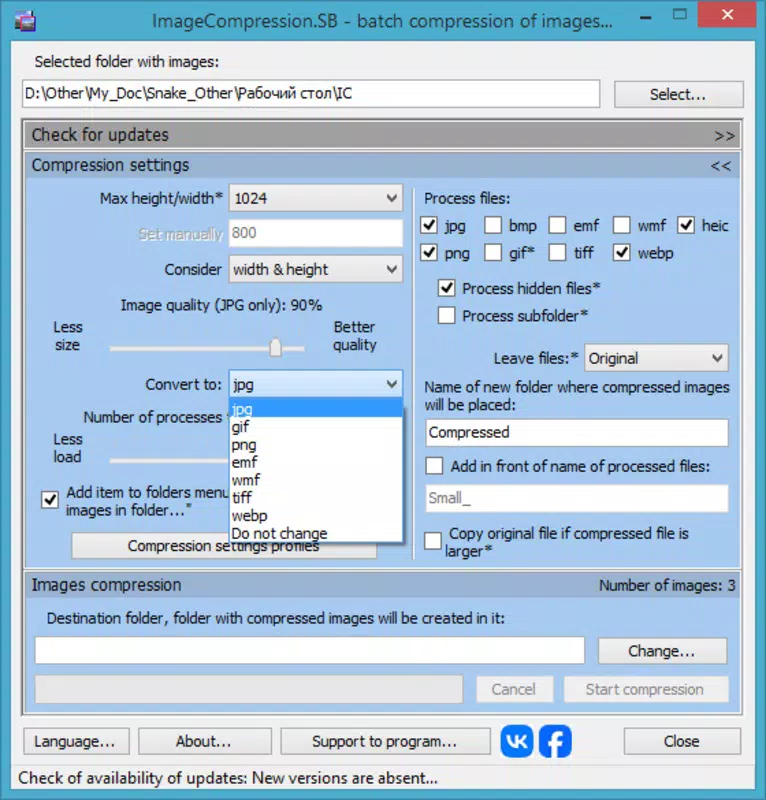
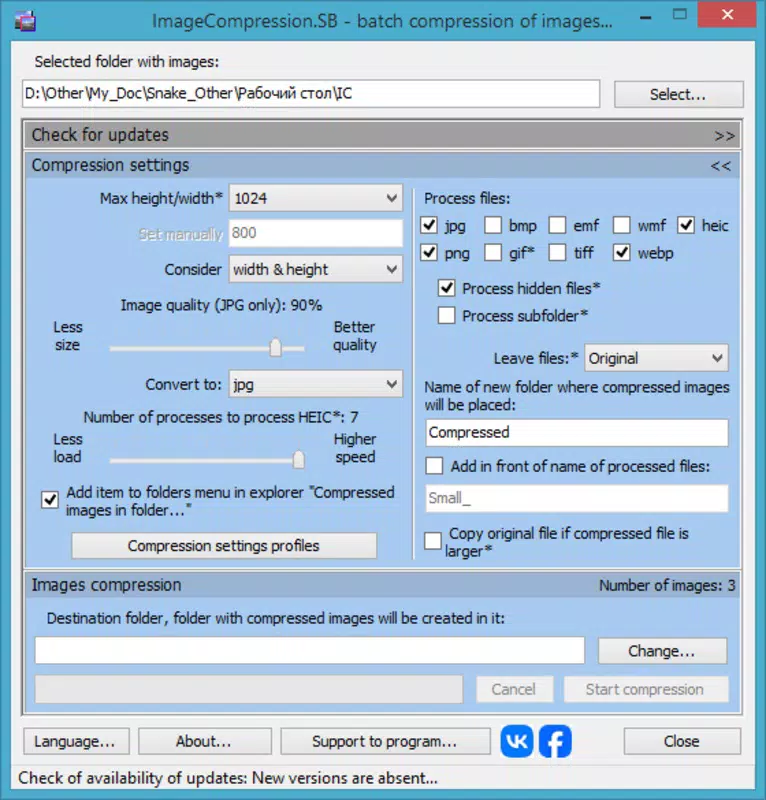
- Custom Compression Settings: Adjustable parameters allow users to define maximum dimensions and JPEG quality levels, enabling a personalized balance between file size and visual fidelity. This flexibility suits both casual and professional workflows.
- Subfolder Handling: The app intelligently processes images within nested directories while preserving the original folder hierarchy, which helps maintain organization during large-scale compression tasks.
- Context Menu Integration: Optional integration with the device’s right-click menu allows users to initiate compression directly from file explorer, minimizing the need to open the app separately.
- Support for Modern Formats: Compatibility with emerging formats like .webp and .HEIC ensures users can work with the latest image types, even on older systems, enhancing versatility and future-proofing.
For example, a travel blogger managing hundreds of high-resolution photos can use the batch feature to compress entire folders before uploading to a blog. Similarly, a student preparing a digital portfolio can reduce file sizes for easier email submission without noticeable loss in quality. These real-world applications highlight the app’s practical value in everyday digital workflows.
Interface, UX & Performance
The user interface of ImageCompression.SB is designed with simplicity and efficiency in mind. The layout prioritizes core functions, placing batch selection and compression settings front and center. Navigation is straightforward, with minimal steps required to initiate a compression task.
Visual design is clean and functional, avoiding unnecessary clutter that could distract from the primary goal—efficient image optimization. Users can quickly access settings, review selected files, and monitor progress through a dedicated status panel. Although the developer did not list formal performance metrics, the app appears optimized for responsiveness across a range of device categories.
It maintains stability during bulk operations, ensuring that compression tasks complete without unexpected crashes. The app handles large directories with consistent performance, suggesting effective memory management. Users can expect smooth interaction during setup and processing phases, even on mid-tier devices.
Responsiveness remains high during file selection and preview stages. The app does not appear to require excessive battery or processing power, aligning with its utility-focused purpose. Overall, the UX reflects a mature, well-thought-out design that prioritizes usability over visual flair.
Platform Compatibility & Technical Requirements
ImageCompression.SB is available for the Windows platform, supporting systems from Windows 7 and above. The app’s file size is listed as 12.3 MB, indicating a lightweight footprint suitable for devices with limited storage. Specific OS version requirements were not listed, so users should consult official sources for compatibility details.
The developer did not provide information on minimum hardware specifications or recommended configurations. While the app supports modern image formats like .webp and .HEIC, the exact system-level dependencies for these features were not disclosed. Users are advised to ensure their device meets general Windows requirements for running third-party applications.
The app’s compatibility with older systems suggests broad accessibility, though performance may vary depending on device capabilities. No additional dependencies or runtime environments were mentioned. For users seeking a lightweight, efficient tool, ImageCompression.SB offers a viable option within the Windows ecosystem.
Pros and Cons
Pros
- Efficient batch processing for multiple image formats
- Preserves original files while generating compressed versions
- Customizable compression settings for quality and size balance
- Supports modern image formats like .webp and .HEIC
- Intuitive interface with minimal learning curve
Cons
- Developer did not specify minimum OS requirements
- Platform availability limited to Windows only
- No cloud sync or backup integration
- Context menu feature may require administrative permissions
- Compatibility with newer Windows versions not confirmed
FAQ
Is ImageCompression.SB safe to download and use?
Yes, the app is designed as a lightweight utility for image compression. It does not collect user data or install third-party software. As with any downloaded application, users should obtain it from official sources to ensure authenticity.
Can I use ImageCompression.SB on my Android or iOS device?
Currently, the app is only available for Windows. There is no official version for Android or iOS platforms.
Does the app delete or modify original images?
No. ImageCompression.SB keeps the original files intact and creates new compressed versions, ensuring no data loss during the process.
How do I update ImageCompression.SB to the latest version?
Users should check the official website or developer page regularly for updates. The app does not include an automatic update feature.
What image formats are supported by ImageCompression.SB?
The app supports standard formats such as JPEG, PNG, GIF, and modern formats like .webp and .HEIC, provided the system meets the necessary requirements.
Final Thoughts
ImageCompression.SB stands out as a focused, reliable tool for users who need to reduce image file sizes without sacrificing quality. Its batch processing capabilities, customizable settings, and support for modern formats make it a valuable addition to any digital workflow. While limited to Windows, its lightweight design and stable performance ensure smooth operation across a wide range of devices.
The app is particularly beneficial for professionals and power users managing large image collections. For those seeking a secure, efficient way to optimize media files, ImageCompression.SB delivers clear value. Download ImageCompression.SB now.


